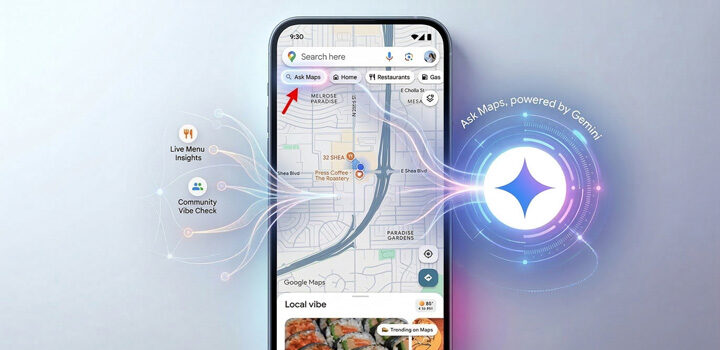
- What happened: Google’s Ask Maps can now call businesses and book appointments for customers, and home repair is one of four launch categories.
- What it means for you: It’s a phone-answering and call-tracking question before it’s a marketing one.
- Do this today: Check one setting in your Business Profile (here’s how).
Google Maps isn’t just helping homeowners find local businesses anymore. It’s starting to make the phone calls for them.
On Nov. 16, 2026, Google announced that its Ask Maps feature can search for available appointments and call businesses on a customer’s behalf. Home repair is one of the four categories Google named, along with automotive, beauty services and pet care. The rollout begins in the U.S. on Android and iOS, as gHacks reported the next day.
What Google has said, and what it hasn’t
Google’s announcement puts home repair in scope. Here’s what’s on the record so far, and what isn’t:
- Ask Maps can search for open appointments and call businesses for customers (announced Nov. 16, 2026).
- Home repair is one of four named categories, along with automotive, beauty and pet care.
- The rollout starts in the U.S. on Android and iOS.
- Which trades count as home repair.
- Which cities or regions get it first.
- Whether the AI books a firm slot or sends a request your office has to confirm.
- Whether it follows your existing Business Profile call setting.
The booking question matters most for the trades. A restaurant table or a haircut is a simple booking. A leaking water heater, a dead AC or a roof estimate often needs a diagnosis, a photo or a site visit before anyone can promise a firm slot. Whether an AI caller can lock in that kind of work, or only gathers details and passes them along, is still undocumented.
Google calling businesses isn’t new in itself. Google already offered automated business calls through Search, as Search Engine Journal has covered. What’s new is folding appointment discovery and those calls into the Ask Maps experience, where a homeowner can simply ask for someone who can come today.
Like this? Get it in your inbox every Saturday.
What changed in home services this week, and what it means for your shop.
No spam. Unsubscribe anytime.
You’re in. Check your inbox (and drag us to Primary). 🔑
A setting worth checking today
Google’s Business Profile help pages document a setting for automated calls made on behalf of customers. Here’s where to find it:
- Open your Business Profile and tap More.
- Go to Business Profile settings, then Advanced settings.
- Find Google automated calls and text messages.
- Under it, look at Bookings and inquiries from customers and decide on purpose whether it should be on.
Google hasn’t said Ask Maps follows this same setting, so don’t assume that flipping it controls whether Ask Maps calls you. But it’s the one documented control that exists today, and most owners have never looked at it.
The cost lands on your phone line
If this does reach the trades, the first effect is on call handling, not rankings. A homeowner who asks Google to find someone who can come today has delegated the first conversation. The thing calling your shop would be software, and it would presumably want a clear answer on availability, timing and probably a price range.
Google hasn’t disclosed how Ask Maps picks which businesses to call or how it treats ones that don’t pick up. So a shop that goes to voicemail or lists out-of-date hours isn’t confirmed to be skipped. But it’s a plausible missed opportunity, and it’s the same missed call you’d be paying to avoid with any other lead.
Tracking is the real work. For any call that appears to come from Google, an owner needs to know:
- Whether a CSR or an AI receptionist answered it.
- Whether it produced a confirmed booking or only an availability inquiry.
- Whether the call-tracking software tagged it correctly, or lumped it in with ordinary Google Business Profile calls.
- Whether it turned into a completed, paying job.
If your phone system supports custom call dispositions, add a category such as “Google Automated Inquiry” so these calls don’t disappear into your general Google numbers. Verify the source before tagging, though. An unfamiliar, automated-sounding call isn’t necessarily from Google, and some phone systems may flag these calls as spam. A shop with aggressive call screening could quietly lose them.
Who gains if it works
If the booking happens inside Google, Google holds the first record of the transaction and the first touch with the customer. That favors anyone who can show clean, current availability: shops with booking or field service software that can publish live capacity, and larger operators with call centers and structured data. It’s less friendly to lead resellers whose job is the introduction, since Google would be doing that step inside Maps.
It also raises the value of customers who come back without going through Google at all: repeat customers, maintenance plans, referrals. Those relationships don’t depend on who the AI decides to call.
The case for ignoring it, for now
There are good reasons to stay calm. A homeowner with no heat at 9 p.m. may want a human who sounds trustworthy, not a scripted exchange. Contractors dispatch against real-time capacity, and an AI booking a slot the office hasn’t confirmed could create double-bookings and angry customers, so some shops may not want to be bookable this way. And since Google hasn’t said which trades count as home repair, the feature may touch only a narrow slice of what you sell.
The sign that this is mostly noise would be no visible change in your call mix or booked jobs after it reaches your market. Until then, the sensible response is housekeeping, not a rebuild of your marketing.
From the Operator
I’ll Take the AI Call. But I’m Not Giving It My Schedule.
 Joshua T. Osborne · Owner, six home service businesses
Bottom line: Leave Google’s booking inquiries on, especially in urgent trades like plumbing and electrical, but don’t let Google promise your schedule. And don’t buy new software until this produces booked jobs.
I’ve been on both sides of this problem. I’ve spent a lot of money getting phones to ring, and I’ve watched what happens when the people answering those phones can’t turn calls into actual jobs.
So when I hear Google wants to start calling contractors on behalf of homeowners, my first thought isn’t about SEO. It’s about who’s answering the damn phone.
Now imagine an AI calling three plumbing companies asking who can get there first. I’d absolutely want to be one of those three companies.
I’d leave Google’s automated booking inquiries turned on, assuming the calls are legitimate and we can handle them properly. But there’s a big difference between answering an availability question and letting Google promise a customer that my technician will be there at 2 p.m. I’m not handing over that decision without knowing what Google’s system can actually see.
Plumbing and electrical are urgency businesses. Somebody has water coming through their ceiling or half their house has no power. If Google’s AI can connect that customer to my office faster, great.
Concrete and other estimate-driven trades are different. We need measurements, project details, photos, and usually an on-site estimate. An automated call asking if we’re available tomorrow doesn’t tell me whether that’s a $15,000 opportunity or someone who’s just shopping around. I wouldn’t want my team treating those two calls the same way.
The other thing I’m watching is what this does to our numbers. If Google starts sending automated inquiries to multiple contractors, my call volume could increase without my actual job count moving at all. On paper, my booking rate looks worse. But the reality might be that we’re answering a bunch of availability checks that never had much chance of turning into work. That’s something I’d want separated in our reporting before making decisions about staffing, marketing, or performance.
My position is pretty simple: I want Google to send us every legitimate opportunity it can. But I want my company controlling the customer experience once that opportunity reaches us. And until I see actual booked jobs coming from this, I’m not spending money on another piece of software just because Google announced something new.
Contractor action checklist
- Check the “Bookings and inquiries from customers” setting under Google automated calls and text messages in your Business Profile, and decide on purpose whether it should be on.
- Check your Business Profile for accurate hours, phone number, service areas and services. Assume anything automated reads it before it calls.
- Pull your missed-call and voicemail rate by hour of day. Every unanswered call is a lost booking attempt whether the caller is a person or software.
- Decide your standard answer to “can you come today, and roughly what does it cost?” so a CSR or an AI receptionist says the same thing every time.
- Add a “Google Automated Inquiry” disposition to your call tracking if your system allows it, and make sure your phone system isn’t blocking or mislabeling unfamiliar numbers.
- Ask your booking or field service software vendor whether it can publish real availability to Google-connected booking tools.
Get next week's checklist in your inbox.
Every Saturday: what changed in home services and exactly what to do about it.
No spam. Unsubscribe anytime.
You’re in. Check your inbox (and drag us to Primary). 🔑
What to watch
Watch which home repair trades and regions are supported, and whether the call goes to every listed business or only those with booking features turned on. Then check your own call logs for callers that sound automated. If they show up, the question becomes how many turn into booked, paid jobs and what it costs to answer the ones that don’t.
Sources
- Google, announcement of Ask Maps appointment search and business calling, Nov. 16, 2026.
- Google Business Profile Help, documentation on automated calls and text messages on behalf of customers.
- Search Engine Journal, coverage of Google’s automated business calls in Search.
- gHacks, “Google Maps’ Ask Maps Can Now Call Businesses and Book Appointments for You,” published Nov. 17, 2026.
Source: gHacks and Google. Get stories like this every Saturday: subscribe to Digital Insider.
More on this topic: AI & Automation coverage